Skip to content
ManageCal

Room and resource booking

A room, a van or a court that cannot be booked twice.

Any sub-calendar can refuse overlapping events. Turn it on for the things that can only be in one place at a time, leave it off for the ones that can, and the double booking is stopped when it is made rather than found when two groups arrive.

01

Turn it on for each sub-calendar that needs it

Double-booking prevention is a setting on a sub-calendar, not on the whole calendar. A meeting room, a van, a treatment room or a court turns it on. A team’s calendar usually leaves it off, because two meetings in one team at the same time is a busy afternoon, not a clash.

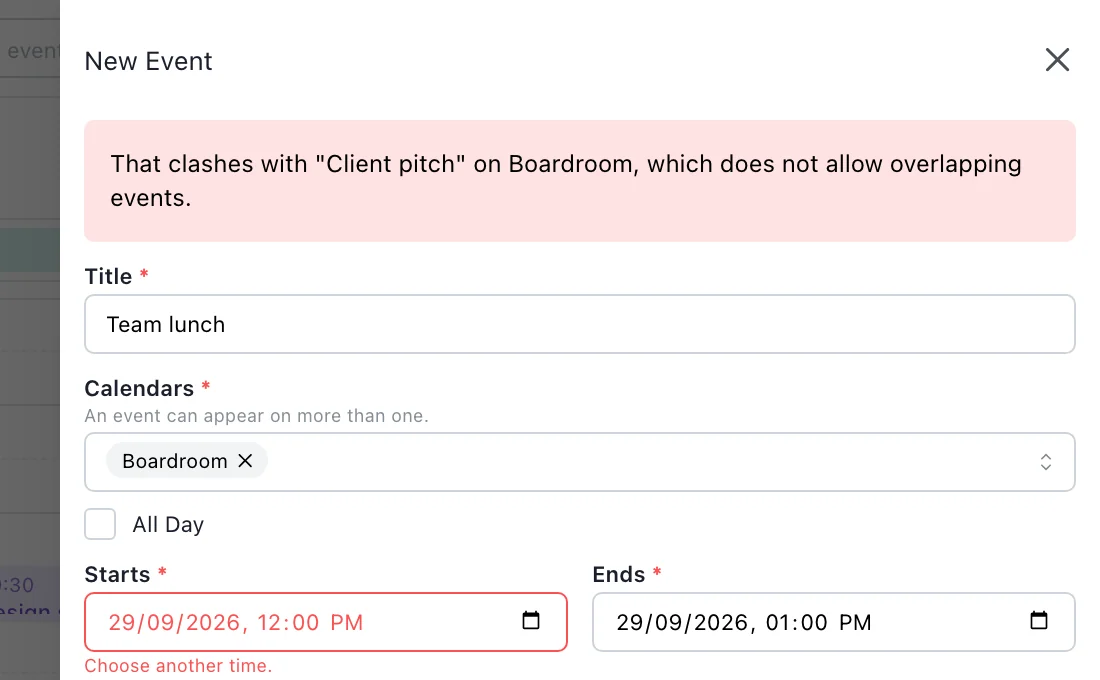
With it on, a booking that would overlap another on that sub-calendar is refused when someone tries to save it. The person saving it is told what it clashes with, so they can pick another time or another room while there is still time to tell people.

A new event called Team lunch on the Boardroom from twelve to one. The drawer shows the message: That clashes with "Client pitch" on Boardroom, which does not allow overlapping events. The start time is marked with Choose another time.
A booking that would overlap another in the boardroom is refused when it is saved.
02

Repeating bookings are checked months ahead

A weekly meeting booked into a room is checked against every other booking in that room, not just its first week. A series that never ends is checked across the coming year. So a clash that would first happen in March is refused in October, when the booking is made.

The same applies the other way round: a one-off booking that lands on a week a repeating one already holds is refused, even though the repeating booking was made long before.

Tuesday 9 MarchBoardroom
09:0010:0011:0012:0013:00
Boardroom
09:00Weekly leadership
09:30Supplier visitRefused
11:00Client call

The weekly meeting was booked in October. The clash is still caught.

03

Back to back is not a clash

A booking that ends at eleven and one that starts at eleven do not overlap, and both are accepted. Rooms can be used all day without leaving gaps to keep the check happy.

04

One booking, several resources

An event can sit on several sub-calendars at once: a meeting in the boardroom that also uses the projector, a job that needs a crew and a van. Each sub-calendar that refuses overlaps checks it separately, so the booking is only accepted if every resource it needs is free.

Changing that booking needs write access to every sub-calendar it is on, which stops someone moving a van they are not allowed to book by editing a job they are.

ThursdayRooms and equipment
09:0011:0013:0015:00
Training Room
09:00New starter training
Boardroom
13:00Board meeting
Projector
09:00New starter training

One event, on the room and the projector it uses.

05

Who can book, and who can see what is booked

Booking is an access level like any other. Give staff Add Only on a room and they can book it but not change anyone else’s booking; give them Modify My Events and they can move their own. People who only need to know whether it is free can have Read Only, No Details, and see every booking as Reserved.

Questions

Room booking: common questions.

Does it stop a person being double-booked?

Only where a person has a sub-calendar of their own with the setting turned on. The check applies within one sub-calendar, so two events on different sub-calendars never clash with each other.

How far ahead are repeating bookings checked?

A series with an end is checked for its whole length. A series that never ends is checked across the coming year, which is a stated limit rather than an oversight: two endless weekly rules have no finite answer.

Is there an approval step for bookings?

No. A booking is accepted if the person has access to make it and nothing clashes. Access levels decide who can book what.

Can guests or the public book a room?

No. ManageCal is for people you add to your workspace. There is no public booking page.

How many rooms and resources can we have?

Each room, vehicle or piece of equipment is a sub-calendar, and sub-calendars are limited per plan: 8 on Free, 40 on Team and 100 on Business. Double-booking prevention is included on Team and Business.

Get started

Put your whole organisation on one calendar.

Set up your sub-calendars, decide who sees what, and start scheduling.

Open ManageCal