Skip to content
ManageCal

Recurring events

A repeating event is one record, however long it runs.

A weekly meeting is not fifty copies of a meeting. In ManageCal it is one event with a rule, so changing one week, skipping one, or moving every future week is a single edit, and nothing is left behind to tidy up.

01

The patterns

Every repeat is set from the event itself. Choose how often, how many units apart, and when it stops.

RepeatsOptions
DailyEvery day, or every 2, 3 … days
WeeklyOn the weekdays you pick, every week or every few weeks
MonthlyOn the same date, every month or every few months
YearlyOn the same date each year
EndsNever, after a number of times, or on a date
02

Change one occurrence, and only that one

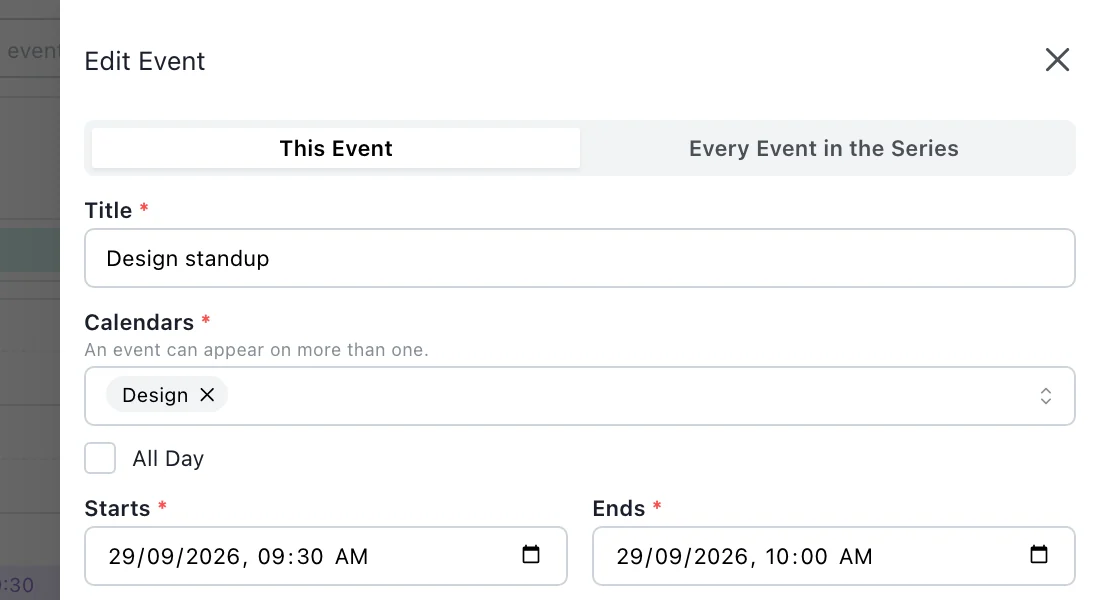
Open any occurrence and choose whether the change is for This Event or Every Event in the Series. A change to one occurrence is kept on its own: rename it, move it, put it in another room, and the rest of the series carries on as before. Skip This One removes a single week and leaves the others.

A changed occurrence starts from its own date and time, not the series’ first one. Renaming the fourth week of a meeting leaves it in the fourth week.

The top of the Edit Event drawer, open on one occurrence of a repeating design standup. A switch offers This Event or Every Event in the Series, with This Event selected, above the title, the calendar and the occurrence’s own start and end times.
Editing one occurrence of a repeating event: This Event, or Every Event in the Series.
03

Nine o’clock stays nine o’clock

Repeats are worked out in the event’s own time zone, in local time, and only then turned into exact moments. A weekly nine o’clock meeting in Berlin is at nine before the clocks change and at nine after, rather than drifting to eight or ten because a fixed number of hours was added.

Every calendar has its own time zone, so offices in different countries each keep their local times.

Weekly meeting, Europe/BerlinAcross the October change
12 Oct09:00
19 Oct09:00
26 Oct09:00
2 Nov09:00
9 Nov09:00
16 Nov09:00

Clocks go back on 25 October. The meeting does not move.

04

A changed week is marked as changed

Open any occurrence and it says whether it repeats. One that was changed on its own is marked Changed, so nobody mistakes a one-off move for the new pattern, and the next person to edit the series can see that week was deliberate.

A series created with a rule more complex than the editor’s own patterns is kept exactly as it was written and shown as a custom rule. It can be replaced with a simple one, but it is never rewritten without anyone asking.

05

Ended, not deleted

A club that runs until the end of term ends on that date. A course of ten sessions ends after ten. The series stops by itself, and past occurrences stay on the calendar as a record of what happened.

06

Checked for clashes all the way along

On a sub-calendar that refuses double bookings, a repeating event is checked against every other booking for its whole length, or across the coming year if it never ends. A clash in its twelfth week is refused when the series is created.

Questions

Recurring events: common questions.

Can I edit just one occurrence of a repeating event?

Yes. Open it and choose This Event. The change is kept on that occurrence alone, and the rest of the series is untouched.

Can I repeat on the second Monday of each month?

Not from the editor, which repeats monthly on the same date. A series created with a more complex rule is kept exactly as written and shown as a custom rule.

What happens to changed occurrences if I edit the whole series?

They stay as they are. A changed or skipped occurrence is its own record, so an edit to the series does not overwrite it.

Do repeating events handle daylight saving?

Yes. They keep their local time through the change, because each occurrence is worked out in the event’s time zone before it is turned into an exact time.

Can I stop a repeating event from a certain date?

Yes. Open it, choose Every Event in the Series, and set it to end on that date. The occurrences before it stay on the calendar as they were.

Can a repeating event be all day?

Yes. Tick All Day and set the repeat as for any other event: a weekly all-day event, a yearly anniversary.

Get started

Put your whole organisation on one calendar.

Set up your sub-calendars, decide who sees what, and start scheduling.

Open ManageCal